
下载地址:
游戏介绍:
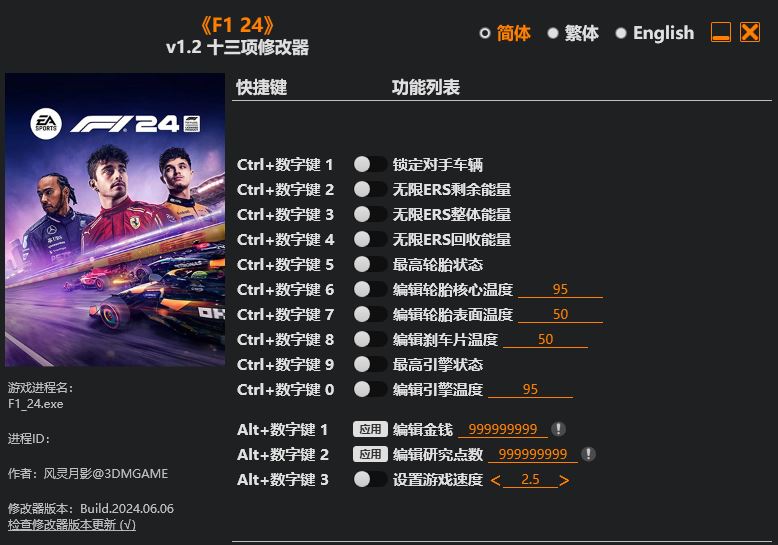
名称:F1 24 Trainer
版本: v1.2+
Ctrl+Num 1 – Freeze Opponents
Ctrl+Num 2 – Infinite ERS Remaining Energy
Ctrl+Num 3 – Infinite ERS Overall Energy
Ctrl+Num 4 – Infinite ERS Harvested Energy
Ctrl+Num 5 – Max Tire Condition
Ctrl+Num 6 – Edit Tire Core Temperature
Ctrl+Num 7 – Edit Tire Surface Temperature
Ctrl+Num 8 – Edit Brake Temperature
Ctrl+Num 9 – Max Engine Condition
Ctrl+Num 0 – Edit Engine Temperature
Alt+Num 1 – Edit Money
Alt+Num 2 – Edit Research Points
Alt+Num 3 – Set Game Speed
NOTES
This game uses EAAntiCheat protection, in order to launch this game without EAAntiCheat, please follow these instructions:
1. Backup the original “EAAntiCheat.GameServiceLauncher.exe” file in your game folder.
2. Copy the “EAAntiCheat.GameServiceLauncher.exe” that comes with the trainer to your game folder.
3. Launch the trainer first, then launch the game.
4. The game will show an online services error, click “Cancel” to continue in offline mode.
Note, if you want to run the game without trainer, please restore the original “EAAntiCheat.GameServiceLauncher.exe”.
这款游戏使用EAAntiCheat反作弊保护,要使用修改器需禁用EAAntiCheat,请按照以下步骤运行游戏:
1. 备份游戏目录中的原始”EAAntiCheat.GameServiceLauncher.exe”文件。
2. 复制修改器附带的”EAAntiCheat.GameServiceLauncher.exe”到游戏目录中。
3. 先运行修改器,再运行游戏。
4. 游戏会提示在线服务错误,点击”取消”即可以离线模式进行游戏。
注意:如果要在不使用修改器的情况下运行游戏,请恢复原始的”EAAntiCheat.GameServiceLauncher.exe”文件。
评论(0)